
security Confidential Computing Meets AI: How Cube AI Protects Your LLM Prompts

sammy oina
· 5 min read

In the race to adopt Large Language Models (LLMs), enterprises and developers face a critical dilemma: how to leverage the power of state-of-the-art AI without compromising the privacy of sensitive data.
When you send a prompt to a traditional AI provider, you are trusting them not to log, read, or train on your data. But in the world of high-stakes finance, healthcare, and proprietary R&D, “trust us” isn’t good enough. You need mathematical proof that your data is private.
This is where Confidential Computing comes in.
In this deep dive, we’ll explore how Cube AI leverages Trusted Execution Environments (TEEs) to provide a mathematically secure enclave for your AI workloads, guaranteeing that even the cloud provider cannot see your prompts.
The Hardware Trust Anchor: How TEEs Work
At the heart of Cube AI’s security model are Trusted Execution Environments (TEEs), specifically utilizing AMD SEV-SNP and Intel TDX.
Traditionally, if you run a VM in the cloud, the cloud provider (the hypervisor context) has technical access to your memory. They could, in theory, dump the RAM and see your unencrypted data.
TEEs change this equation by encrypting the virtual machine’s memory at the hardware level.
-
Memory Encryption: The CPU automatically encrypts data written to RAM and decrypts it only inside the CPU core. The keys are managed by a secure processor and are never exposed to the hypervisor or host OS.
graph TD subgraph CPU ["CPU Package (Trusted Boundary)"] Core["CPU Core<br/>(Data is Plaintext)"] ME["Memory Encryption Engine<br/>(AES-128/256)"] end subgraph RAM ["System Memory (Untrusted)"] EncData["Encrypted Data<br/>(Ciphertext)"] end subgraph Host ["Hypervisor / Host OS"] Admin["Cloud Admin / Root"] end Core <--> ME ME <-->|Encrypted Read/Write| EncData Admin -.->|Attempts to Read| EncData Admin -- "Sees Garbage" --> EncData style CPU fill:#ecfdf5,stroke:#22c55e,stroke-width:2px,color:#000 style RAM fill:#f8fafc,stroke:#eab308,stroke-width:2px,color:#000 style Host fill:#fef2f2,stroke:#ef4444,stroke-width:2px,color:#000 -
Remote Attestation: This is the “proof” part. The hardware generates a cryptographic “quote”—a digital signature signed by the processor’s manufacturer key. This quote serves as proof that:
- The software running is exactly what you expect (measured by a hash).
- The hardware protections (SEV-SNP/TDX) are active.
- The environment hasn’t been tampered with.
Why Traditional LLM APIs Expose Privacy Risks
When you use a standard API (like OpenAI or Anthropic), the flow usually looks like this:
-
TLS encrypts data in transit (good).
-
Provider decrypts data on their server to process it (necessary).
-
Risk Zone: While the data is processed, it is visible in plain text in the server’s memory.
- Insider Threats: Rogue admins with root access could potentially inspect memory.
- Side-Channel Attacks: Exploits like Spectre/Meltdown or purely software-based memory scrapers could exfiltrate data.
- Data Retention: Mistakes in logging configurations could accidentally save sensitive prompts to persistent storage.
graph LR
    User([User]) -->|TLS Encrypted| Gateway[API Gateway]
    Gateway -->|Plaintext| Server[Model Server]

    subgraph RAM ["Server Memory (RAM)"]
        Prompt["User Prompt<br/>(Plaintext)"]
    end

    Server -- Processing --> Prompt

    Hacker[Attacker / Malware] -.->|Side Channel| Prompt
    Admin[Rogue Employee] -.->|Direct Memory Dump| Prompt
    Logs[Log Collector] -.->|Misconfiguration| Prompt

    style Prompt fill:#ef4444,stroke:#7f1d1d,color:#fff,stroke-width:2px
    style RAM fill:#e2e8f0,stroke:#94a3b8,color:#333
    style Hacker stroke:#ef4444,stroke-dasharray: 5 5
For regulated industries, this “Processing in the Clear” is a major compliance hurdle.
Cube AI Architecture: Isolation by Design
Cube AI solves this by moving the entire inference process into a TEE.
The LLM (Ollama or vLLM) runs inside a Confidential VM. The model weights are decrypted only inside this enclave. Your prompts are encrypted with a key that is only released to the enclave after it proves its identity via attestation.
The Protected Inference Flow
Here is how Cube AI isolates your data:
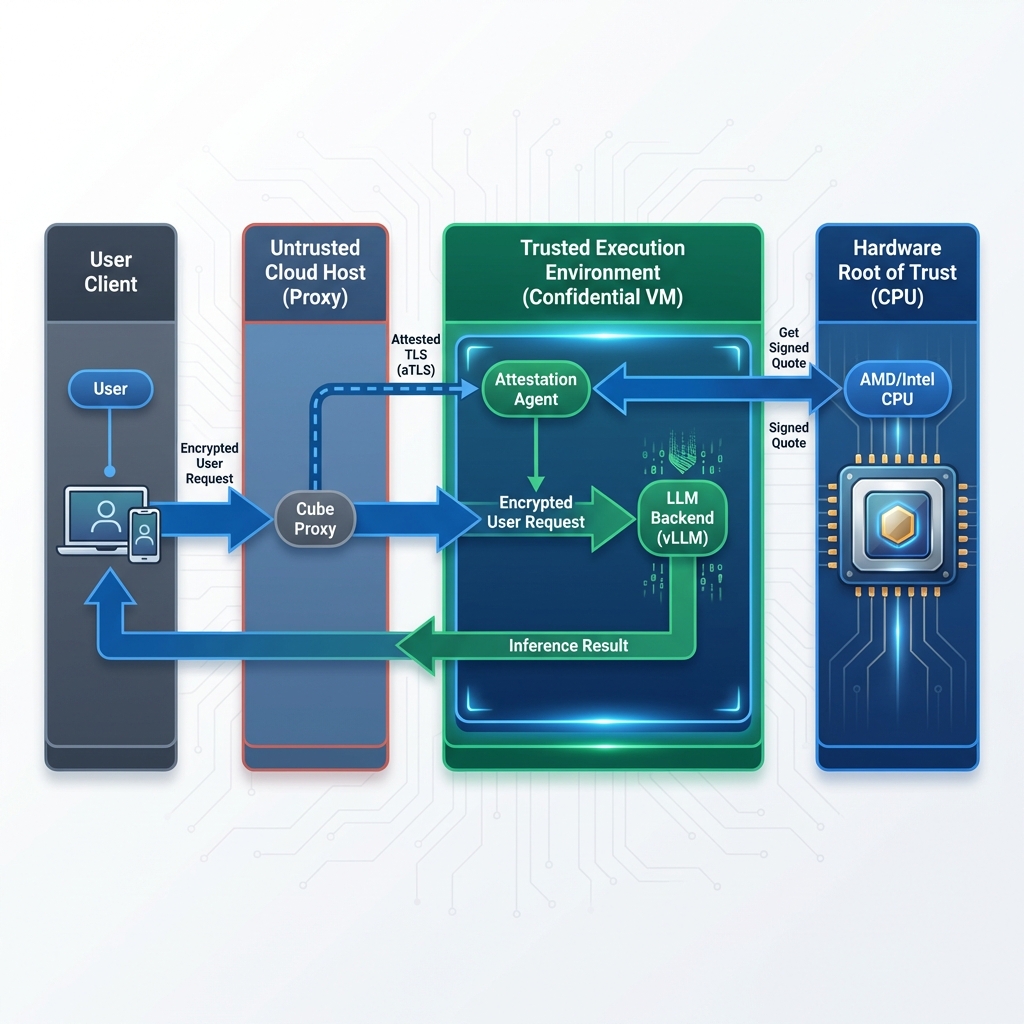
- Attestation Handshake: The connection negotiation starts with an Attested TLS (aTLS) handshake. The Attestation Agent sends its certificate along with a hardware-signed quote.
- Proxy Verification: The Cube Proxy verifies this quote against a strict attestation policy. Unlike standard TLS which blindly trusts a Certificate Authority, the Proxy validates the hardware identity and software integrity of the Agent.
- Secure Tunnel: Once verified, an encrypted aTLS tunnel is established between the Proxy and the Agent.
- Inference Proxying: The User sends an encrypted prompt to the Proxy, which forwards it through the aTLS tunnel. The Agent then proxies this request to the local LLM backend (vLLM/Ollama) running inside the enclave. Use the same key.
Practical Example: Private Medical Diagnosis
Imagine a healthcare provider building an AI assistant to analyze patient records for rare disease patterns.
- The Data: Highly sensitive patient history, genetic markers, and lab results.
- The Risk: Uploading this to a public LLM violates HIPAA and GDPR.
- The Cube AI Solution:
- The hospital’s application connects to their private Cube AI instance.
- It verifies the instance acts as a “black box” via Remote Attestation.
- It sends the patient data.
- Insight: The model analyzes the data in memory (which is encrypted at the hardware level).
- Result: The diagnosis is returned encrypted.
- Aftermath: Once the request is done, the data in memory is wiped. No logs, no training, no eyes on the data.
Key Takeaway
Cube AI shifts the trust model from policy-based security (“we promise we won’t look”) to technology-based security (“we physically cannot look”).
By combining the power of open-weights models (like Llama 3, Mistral) with the hardware-grade isolation of Confidential Computing, Cube AI allows you to deploy the most powerful AI capabilities on your most sensitive data—without losing sleep over privacy.
Ready to secure your AI workloads? Check out our Getting Started guide or explore the Attestation Documentation.